Create your account
~1 minute
Go to dicevision.dirtyowlbear.com and sign up with your email address.
Get your camera set up and make your first roll in about ten minutes. Most of that is positioning a phone — the app does the rest.
~1 minute
Go to dicevision.dirtyowlbear.com and sign up with your email address.
~2 minutes
Your phone camera gives you significantly better results than a laptop or desktop webcam — higher resolution, better low-light performance, and, most importantly, you can position it exactly where you need it. This guide assumes you're using a phone.
~5 minutes
The accuracy of every roll depends on the quality of the photo. Spend a few minutes getting this right and the app will do the rest.
DiceVision reads printed face values — numerals and pips — the same way you do. It works best when those values are clear and unambiguous.
Standard numerals, like a typical Chessex set — clean, unambiguous, and high contrast between ink and plastic.
Stylized numeral fonts. The more decorative, the harder it is to read reliably. If the numbers are still clearly recognizable as numbers it will likely work, but accuracy may vary.
When in doubt: if you have to look twice to read the value, the app will too.
Use a plain, matte surface — a dice tray with a solid-color insert works well. Good contrast between your dice and the surface makes detection much easier. Avoid:
The goal is a straight-down view of your rolling surface with no angle distortion.
A few mounts that work well:
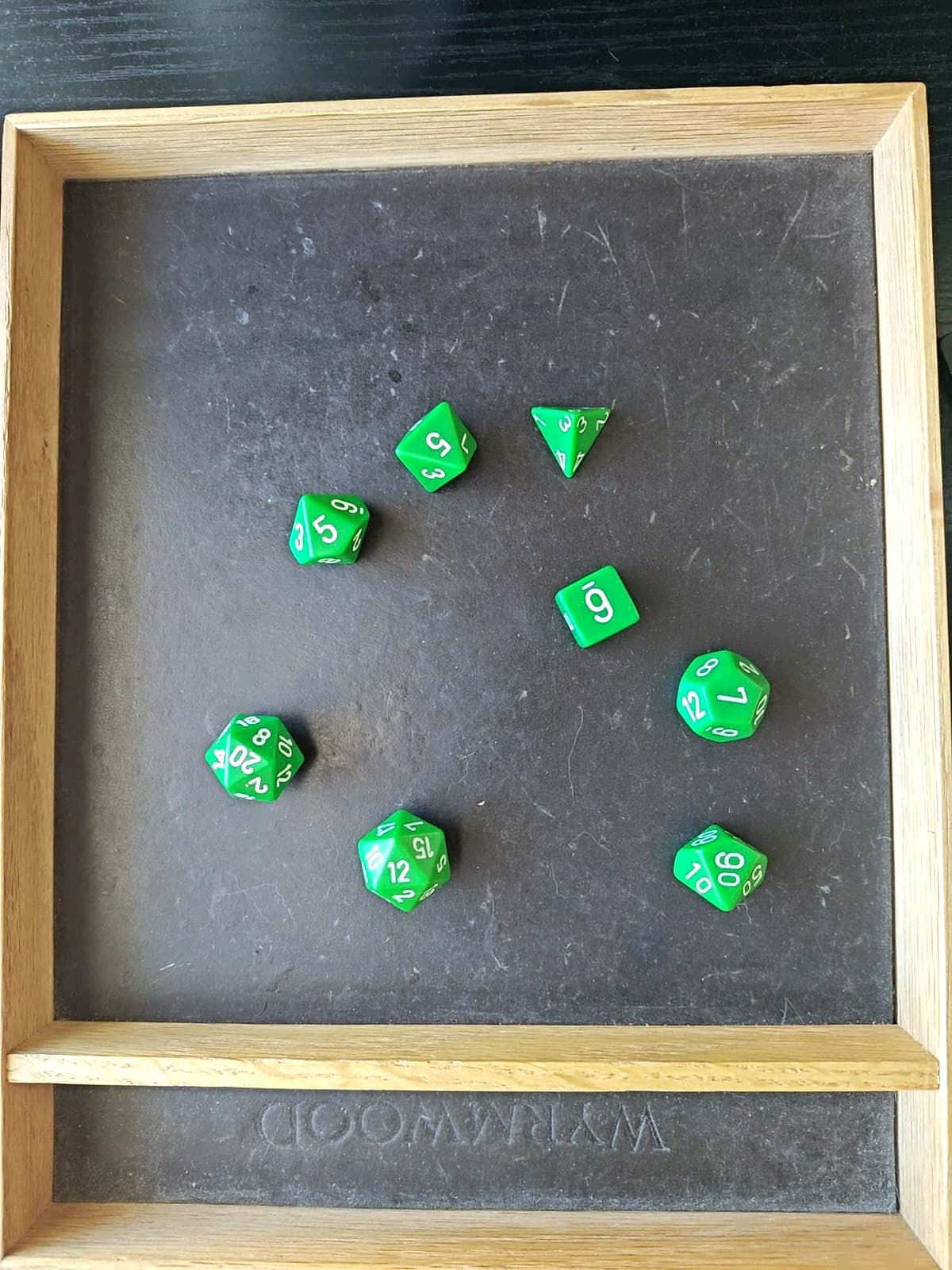
Getting the height right: at the ideal distance the camera captures roughly a 10¼″ × 8¼″ area — enough to fit a full 7-die set with comfortable space on all sides. Use the live feed on your dashboard to check: if a complete set fits within the frame with a similar margin to the example below, you're at the right height.

Even, diffuse light is what you're after — harsh shadows across die faces will obscure values.
~1 minute
You're already on the Dashboard from the previous step. Here's how your first roll works:
That's it. If the dice types and values look correct, you're all set.
If a value is wrong, tap it to submit a correction — this helps improve detection over time.
Now that you're rolling, a few ways to get more out of DiceVision.
Adjust motion sensitivity, capture timing, focus lock, and other settings for more accurate rolls.
Guide coming soonPost results straight to Discord, Talespire, or Draw Steel's Codex — automatically, as you roll.
See integrations →Flag a misread so the team can sharpen detection. Every correction makes the next roll better.
Guide coming soonThe usual snags, and the quick fix for each.
The QR code connects two devices on the same network. Disable any VPN and make sure your phone and desktop are on the same Wi-Fi, then regenerate the code.
The inference servers spin up on demand. The first roll after a few idle minutes can take 10–30 seconds — after that it's fast. This is normal.
Usually it's the photo, not the dice. Check for glare, even out your lighting, raise the contrast between dice and surface, and favor clean numerals. Tap any wrong value to correct it.
Dice outside the frame can't be read. Confirm your whole rolling area is in view on the live feed, and that the camera is straight down and parallel to the surface.